If you're a gamer or even if you're not, you may have come across some web rpg's or other games like that. (I'm sure everyone knows at least one World of warcraft geek :D )
I personally play http://old.thecyberwar.com - a hacker rpg and http://www.theninja-rpg.com/ a naruto rpg.
Every role-playing-game has it's in-game currency like gold, wood or stuff like that. Even though it's sometimes illegal, you can sell these credits for real cash. I earned my first bucks in paypal that way. I'm very good at some games and I'm rich so i can sell that cash for...well... cash.
If you like playing web rpg's this may be a pretty good money earner.
There is also a site that specifies on selling power leveling, gold, gear or even whole accounts on MMORPG's (massive multiplayer online role playing games). (Mainly WoW and guild wars)
http://www.accountol.com is a good example, you select your game then you see some offers, or if you want, you can also search for your favorite class, race, price...
This is a very good money maker, though i don't know how many people buy this stuff, but the prices are very high, some even go above 1,000$ !!
Thursday, January 10, 2008

Saturday, January 5, 2008
Entrecard.com
I guess since this is the thing that brought me most of my traffic, i should describe it :)
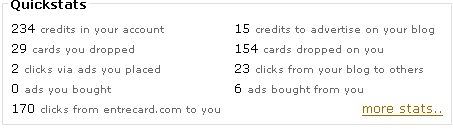
It's not intended to make money, it's only for advertising your blog. It has it's own currency called ECs. You place a small widget on your page and you gain these credits by displaying ads on it. You get paid credits every 24 hours of displaying an ad. To increase the amount of credits you get per ad displayed, you need to get visits from other entercard members who click the "drop yours" button under the widget. By doing that, they get 1 credit and it increases the cost to display an ad on your page, so you get more credits per ad.
Here are my stats at the minute:

It's actually pretty simple and it's a great way to get some traffic to your blog. I can say it's a must have for any serious blogger.
It's not intended to make money, it's only for advertising your blog. It has it's own currency called ECs. You place a small widget on your page and you gain these credits by displaying ads on it. You get paid credits every 24 hours of displaying an ad. To increase the amount of credits you get per ad displayed, you need to get visits from other entercard members who click the "drop yours" button under the widget. By doing that, they get 1 credit and it increases the cost to display an ad on your page, so you get more credits per ad.
Here are my stats at the minute:
It's actually pretty simple and it's a great way to get some traffic to your blog. I can say it's a must have for any serious blogger.
Friday, January 4, 2008
The Easiest Way to Make a Paypal Donate Button
(this article was originally featured at scholarpreneur.com)
Like other people, I had some trouble finding a simple Paypal donate button to put on my blog. After some searching around, I found an easy way to do it myself.
The easiest, safest, and best way to put a Paypal donate button on your Wordpress blog or website is through the Paypal website. Don’t download plugins or widgets with who knows what kind of code in them, when you’re dealing with yours and other’s money.
So how do you do it?
Short guide:
Go to the Paypal Donations Factory. Add the name of your website, pick the button style you want, and click “create button now.” Copy and paste the code given into your blog post or a text widget on your wordpress sidebar.
Long guide:
1. Login to your Paypal account.
2. Click on the Merchant Services tab.
3. Click on the Donate link. It’s under the Create Buttons category.
4. Enter the required information. Donation name/service can be whatever you want, but make it accurate. What they’re asking for is the name of your website or business. You can set a required dollar Amount for your donors to give if you want, but leave it blank if you want to let them set their own amount.
5. Select what you want your button to look like (you can make your image if you want later.)
6. I highly recommend you keep the encryption setting on. This will keep your Paypal information (like your email address) hidden from other people.
7. When you’re done click “Create button now.”
8. The code will be generated and given to you in the first box.
8. Copy all the code in that box and paste it into the html code of your blog or website. If you’re using Wordpress, then you have to click on the “code” tab of the post you’re writing.
9. Click the button on your site to make sure you don’t get any errors.
If you get a “We were unable to decrypt the certificate id” error, your code may have gotten a little messed up after you pasted it. The most likely case is that your blog software or page editor is putting line breaks where they’re not supposed to be. This happened to me. Go back to your button code and look at the very bottom, where it says this:
PKCS7—–
“>
See the quotation mark on the second line? Click in front of it and push backspace to pull that quotation mark up to the previous line, like this:
PKCS7—–”>
Now try it again and see if it takes you to the donation page. Wordpress has a weird way of processing html code. If you already saved your post, you might have to re-paste the code and follow step 9 again.
That’s it! If you want to put this on your Wordpress sidebar, just create a new Text widget, and copy and paste this code into the widget. And boom, there’s your donate button!
Like other people, I had some trouble finding a simple Paypal donate button to put on my blog. After some searching around, I found an easy way to do it myself.
The easiest, safest, and best way to put a Paypal donate button on your Wordpress blog or website is through the Paypal website. Don’t download plugins or widgets with who knows what kind of code in them, when you’re dealing with yours and other’s money.
So how do you do it?
Short guide:
Go to the Paypal Donations Factory. Add the name of your website, pick the button style you want, and click “create button now.” Copy and paste the code given into your blog post or a text widget on your wordpress sidebar.
Long guide:
1. Login to your Paypal account.
2. Click on the Merchant Services tab.
3. Click on the Donate link. It’s under the Create Buttons category.
4. Enter the required information. Donation name/service can be whatever you want, but make it accurate. What they’re asking for is the name of your website or business. You can set a required dollar Amount for your donors to give if you want, but leave it blank if you want to let them set their own amount.
5. Select what you want your button to look like (you can make your image if you want later.)
6. I highly recommend you keep the encryption setting on. This will keep your Paypal information (like your email address) hidden from other people.
7. When you’re done click “Create button now.”
8. The code will be generated and given to you in the first box.
8. Copy all the code in that box and paste it into the html code of your blog or website. If you’re using Wordpress, then you have to click on the “code” tab of the post you’re writing.
9. Click the button on your site to make sure you don’t get any errors.
If you get a “We were unable to decrypt the certificate id” error, your code may have gotten a little messed up after you pasted it. The most likely case is that your blog software or page editor is putting line breaks where they’re not supposed to be. This happened to me. Go back to your button code and look at the very bottom, where it says this:
PKCS7—–
“>
See the quotation mark on the second line? Click in front of it and push backspace to pull that quotation mark up to the previous line, like this:
PKCS7—–”>
Now try it again and see if it takes you to the donation page. Wordpress has a weird way of processing html code. If you already saved your post, you might have to re-paste the code and follow step 9 again.
That’s it! If you want to put this on your Wordpress sidebar, just create a new Text widget, and copy and paste this code into the widget. And boom, there’s your donate button!
Tuesday, January 1, 2008
125x125 ads
I'm testing a new way to get cash from blogs. You have the chance to advertise your site with 125x125 size banners.
These ads appear at the top of the right sidebar on the blog with a maximum of 2 buttons. They are currently priced at $1/week (it was $2/week before). To set up your ad, email your button to " tim @ t-2.net " for approval; once approved you’ll get instructions for sending the payment via PayPal. These ads will NOT have no-follow in them. So this is also a way to improve your PageRank.
These ads appear at the top of the right sidebar on the blog with a maximum of 2 buttons. They are currently priced at $1/week (it was $2/week before). To set up your ad, email your button to " tim @ t-2.net " for approval; once approved you’ll get instructions for sending the payment via PayPal. These ads will NOT have no-follow in them. So this is also a way to improve your PageRank.
Sunday, December 30, 2007
Things to do in 2008!!
Well it seems I'm a very impulsive and moody person, I was too lazy to write anything here for the past two or three weeks, but now I'm posting three posts almost all at once hehe.
So since it's almost time to make the jump to the year 2008 (which is supposed to be a very good year for me according to the horoscope?), I'll write what i plan on doing.
Well i decided to focus on my personal life for a while, I'm gonna try to get fit, not that I'm a fat nerd hiding in a basement, but i could loose a few pounds.
Not that you care about my personal life lol.
I'm gonna limit myself to things that regard my net life:
**Get another blog started (probably about gaming (yeah I'm also a gamer...and a coder...and a net junkie (someone needs a life lol(wow thats a lot of brackets))))
**focus more on learning and developing new skills
**gain more publicity and cash
**post more posts :D
**get drunk on the next new year's eve as well haha (am i drunk now? who knows)
i especially look forward to the last one :D
see ya next year
~D4rk
So since it's almost time to make the jump to the year 2008 (which is supposed to be a very good year for me according to the horoscope?), I'll write what i plan on doing.
Well i decided to focus on my personal life for a while, I'm gonna try to get fit, not that I'm a fat nerd hiding in a basement, but i could loose a few pounds.
Not that you care about my personal life lol.
I'm gonna limit myself to things that regard my net life:
**Get another blog started (probably about gaming (yeah I'm also a gamer...and a coder...and a net junkie (someone needs a life lol(wow thats a lot of brackets))))
**focus more on learning and developing new skills
**gain more publicity and cash
**post more posts :D
**get drunk on the next new year's eve as well haha (am i drunk now? who knows)
i especially look forward to the last one :D
see ya next year
~D4rk
What am i doing?
I won't keep any secrets from you, I won't just post my earnings for every moth then just post random stuff, I'll tell you exactly where i got any cash, how many impressions were needed, where i got readers and well basically every step from the bottom up. This isn't just a blog, this is D4rksorrow's blog! :)
So what did i do to promote this blog and how i get cash?
You see all of those icons here on the right, I'll explain what these all are.
Fist of course is the RSS button... WTF it's huge! Yea i know, it's sexy.
Then you see the readers, yea the number is still low, but I'm trying my best to push it higher. Well then there's the subscription by mail button and the "Do follow" mark. I removed no follow, well I'm not 100% sure it worked, but i don't care that much either.
Then there's Adsense, nothing special, every blog should have one.
Well now we come to those pretty buttons, click them, all of them, then the adsense thingy, I'm thankful if you really did that :)
We'll those buttons are just to help promote my blog, each of these sites has a backlink to me and if you click the buttons you also bookmark me and stuff like that. I should get more of that by the way...
Well then of course is the hit counter and just below that is the entrecard button, I'll explain it better later...
Then it's a widget from widgetbucks, this is the only widget i got a registered click for, that's just awful, the very low click rate from widgetbucks is very disapointing. Then it's the bidversiter ads... wow i have all the big ad companies in my blog, i wonder where the most cash will come, this may be interesting.
Then it's a link to cloudie's blog, she's a very good person, she got me into this whole blogging world :) . The next thing to see is the recent readers window, there seems to be quite a few people coming to my blog, too bad i don't get much comments tho.
So what did i do to promote this blog and how i get cash?
You see all of those icons here on the right, I'll explain what these all are.
Fist of course is the RSS button... WTF it's huge! Yea i know, it's sexy.
Then you see the readers, yea the number is still low, but I'm trying my best to push it higher. Well then there's the subscription by mail button and the "Do follow" mark. I removed no follow, well I'm not 100% sure it worked, but i don't care that much either.
Then there's Adsense, nothing special, every blog should have one.
Well now we come to those pretty buttons, click them, all of them, then the adsense thingy, I'm thankful if you really did that :)
We'll those buttons are just to help promote my blog, each of these sites has a backlink to me and if you click the buttons you also bookmark me and stuff like that. I should get more of that by the way...
Well then of course is the hit counter and just below that is the entrecard button, I'll explain it better later...
Then it's a widget from widgetbucks, this is the only widget i got a registered click for, that's just awful, the very low click rate from widgetbucks is very disapointing. Then it's the bidversiter ads... wow i have all the big ad companies in my blog, i wonder where the most cash will come, this may be interesting.
Then it's a link to cloudie's blog, she's a very good person, she got me into this whole blogging world :) . The next thing to see is the recent readers window, there seems to be quite a few people coming to my blog, too bad i don't get much comments tho.
PageRank 3/3 Profit!
Well since we don't want to get our page rank up high to boast about it in front of girls, we're now gonna find out how to make it into profit....
Naturally you want your site to be on the first page of a search engine, if someone is looking for lets say a laptop, it's very likely he will buy it from one of the sellers on the first page right?
If you're not on the first page of google or yahoo or something, it's almost the same as you weren't even here.
It's been researched that most of the clicks are made on the first page, only a few go to the second page and only true masochists search on the 4th, 5th etc. page.
So how to get on the first page of the results? It's not that simple, far from it, well unless you want to get to the first page for a word that only has like 10 results...
Theres a whole bunch of things that influence on which site will pop up in the top, but for now lets focus on PageRank.
Well we probably don't have a pagerank that good, so if our pagerank is at least 3 or 4, then we can sell links! You can sell links from your page on a page which desperately needs your vote...
And so you don't need to go through all the trouble of looking for people that would pay for that, you have text link ads. You can simply register your site and when a buyer comes along, the link goes on your site and you get cash. It also works the other way around, you can buy links to promote your site. You can't exactly get rich with this, but anything is good, right?
Naturally you want your site to be on the first page of a search engine, if someone is looking for lets say a laptop, it's very likely he will buy it from one of the sellers on the first page right?
If you're not on the first page of google or yahoo or something, it's almost the same as you weren't even here.
It's been researched that most of the clicks are made on the first page, only a few go to the second page and only true masochists search on the 4th, 5th etc. page.
So how to get on the first page of the results? It's not that simple, far from it, well unless you want to get to the first page for a word that only has like 10 results...
Theres a whole bunch of things that influence on which site will pop up in the top, but for now lets focus on PageRank.
Well we probably don't have a pagerank that good, so if our pagerank is at least 3 or 4, then we can sell links! You can sell links from your page on a page which desperately needs your vote...
And so you don't need to go through all the trouble of looking for people that would pay for that, you have text link ads. You can simply register your site and when a buyer comes along, the link goes on your site and you get cash. It also works the other way around, you can buy links to promote your site. You can't exactly get rich with this, but anything is good, right?
Subscribe to:
Posts (Atom)